Wildglide · Hike & fly planning
Glide ratio calculator for hike & fly
Explore how far you could glide over real terrain. Wildglide combines wind-adjusted glide reach, elevation profiles, forecast wind, measured windstations and paragliding takeoff locations on one map.
Choose your takeoff, set a glide ratio and inspect the reachable terrain. Compare routes and remaining height before moving from the planning model to your own flight preparation. Wildglide, also written Wild Glide, runs in your browser.
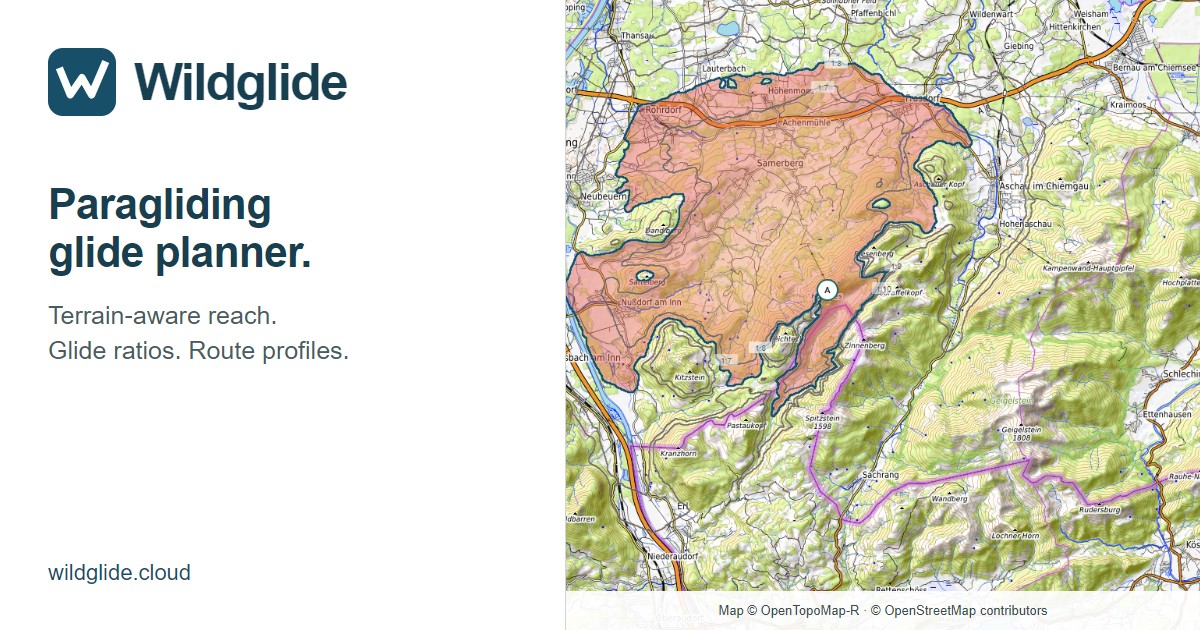
Terrain, wind and takeoffs in one workflow
Terrain-aware glide reach
Compare glide-ratio contours and inspect routes around ridges. The full-detail search uses a 10 m or 30 m grid; the elevation profile shows terrain and calculated flight altitude.
Wind in the calculation
Wind speed, direction and your airspeed affect calculated ground reach. Forecast wind varies with location, time and height. Suitable nearby station measurements can locally adjust it.
Measured windstations on the map
Inspect mean wind, gusts, measurement age and available history. Keep observations distinct from forecasts and see when readings are old or missing.
Paragliding takeoff map
Explore thousands of OSM takeoff locations, inspect available wind sectors and set a location as your start. Coverage is incomplete; inclusion does not establish permission or suitability.
How do you calculate glide distance?
In still air, theoretical horizontal distance equals usable height loss multiplied by glide ratio. A glide ratio of 8 means 8 metres forward for each metre down; Wildglide displays this as 1:8, height loss to distance.
1,000 m × 8 = 8,000 m
With 1,000 m of usable height loss and a glide ratio of 8, the idealised still-air distance is 8 km. Take the required arrival height and reserve into account before using this simple example.
The map calculation goes further: it checks terrain along paths, accounts for detours and applies the selected wind. A flat-distance estimate alone cannot show whether a ridge interrupts your glide.
What changes with headwind and tailwind?
Headwind reduces ground speed and ground reach; tailwind can increase them. Crosswind requires compensation and reduces the airspeed component available along the intended track.
Glide ratio 8 · airspeed 40 km/h · wind 10 km/h
With constant sink and wind directly along the track, 10 km/h headwind gives an effective ground glide ratio of 6; 10 km/h tailwind gives 10. These are simplified examples without terrain, gusts or changing wind.
Live Wind uses Open-Meteo forecast data. With “Include wind from stations”, valid recent measurements can correct the local forecast. A station must meet age, height and data-quality criteria; its influence decreases with distance and height separation. Gusts are shown separately and are not applied as steady wind. Read the wind sources and correction limits.
Plan a hike & fly descent
- Choose a launch. Search the map or enable “show takeoffs”, inspect a location and select “Set as start”. Check access and launch rules separately.
- Set your assumptions. Choose glide ratio, starting altitude, clearance and airspeed. Inspect forecast wind and the station contribution to planning.
- Compare the terrain. Read the reach contours, use “Check line” to place waypoints and inspect the elevation profile and remaining reach.
- Review the conditions. Inspect station timestamps, mean wind and gusts. Assess weather, obstacles, airspace and landing options independently before flying.
This is a flight-glide planner for hike & fly, not a walking-route or hiking-time calculator. Step-by-step Wildglide instructions.
Fine calculation detail, clear limits
A 10 m search grid describes the spacing of calculation points, not a guarantee of 10 m terrain accuracy. Source elevation data have varying resolution and accuracy. Detailed regional map shading improves the view but does not change the elevation data used by the glide calculation.
Wind forecasts and local station corrections cannot resolve every valley flow, gust or turbulent area. The model uses a constant still-air glide ratio and does not model thermals or real turning losses. Low data mode uses a coarser estimate. Results are planning estimates, not evidence of a safe flight path.
Elevation sources · Takeoff coverage and credits · Calculation model